Nov. 24, 2026 · 8 min read

You have dozens of technical bids on your desk and a couple of days to review them. How can you tell what each supplier has actually committed to delivering?
Or perhaps you are the one writing the proposal. How do you make sure it meets every criterion before you submit it?
On either side of the bid, much of the work comes down to the same question. What in the proposal shows that a requirement has been met? Answering it means finding the relevant passage, checking what it covers and making a note of any gaps.
Across dozens of long documents in different formats, that search can take up much of the time set aside for review. And even when two reviewers find the same passage, they may disagree about what the requirement calls for.
How could AI make these reviews easier and leave us more time to weigh the evidence and make decisions?
At Nagarro, we developed Criterio to speed up document reviews. It uses AI to help teams analyse technical documents, check how well they meet the requirements and compare proposals against the same criteria.
Those criteria are set out in evaluation rubrics. Each proposal is assessed against the same questions and scoring scale, which gives reviewers a way to compare scores and check the evidence behind them. That structure is what distinguishes a Criterio review from asking an AI model a series of questions about a document.
For a procurement team, the rubrics provide a way to assess the bids it receives. Teams responding to requests for proposals (RFPs) or writing other technical proposals can use them earlier, while there’s still time to revise a draft.
In our consulting work, we’ve seen how difficult it can be to judge how closely a supplier’s bid matches what an organisation has asked for.
Part of the difficulty is that every supplier organises its bid differently. Where one devotes a whole section to a requirement, another may mention it only in passing. Once reviewers find the relevant passage, they still have to decide whether there’s enough evidence to justify the score they give.
Criterio structures this work around evaluation rubrics. Each rubric sets out the questions reviewers want answered, the criteria to apply and the scoring scale to use across proposals.
Think back to those bids on your desk. Suppose each supplier is bidding to build a new technology platform. Your team has just two days to compare the proposed architectures, the way each supplier plans to work, the deliverables and the criteria for accepting them.
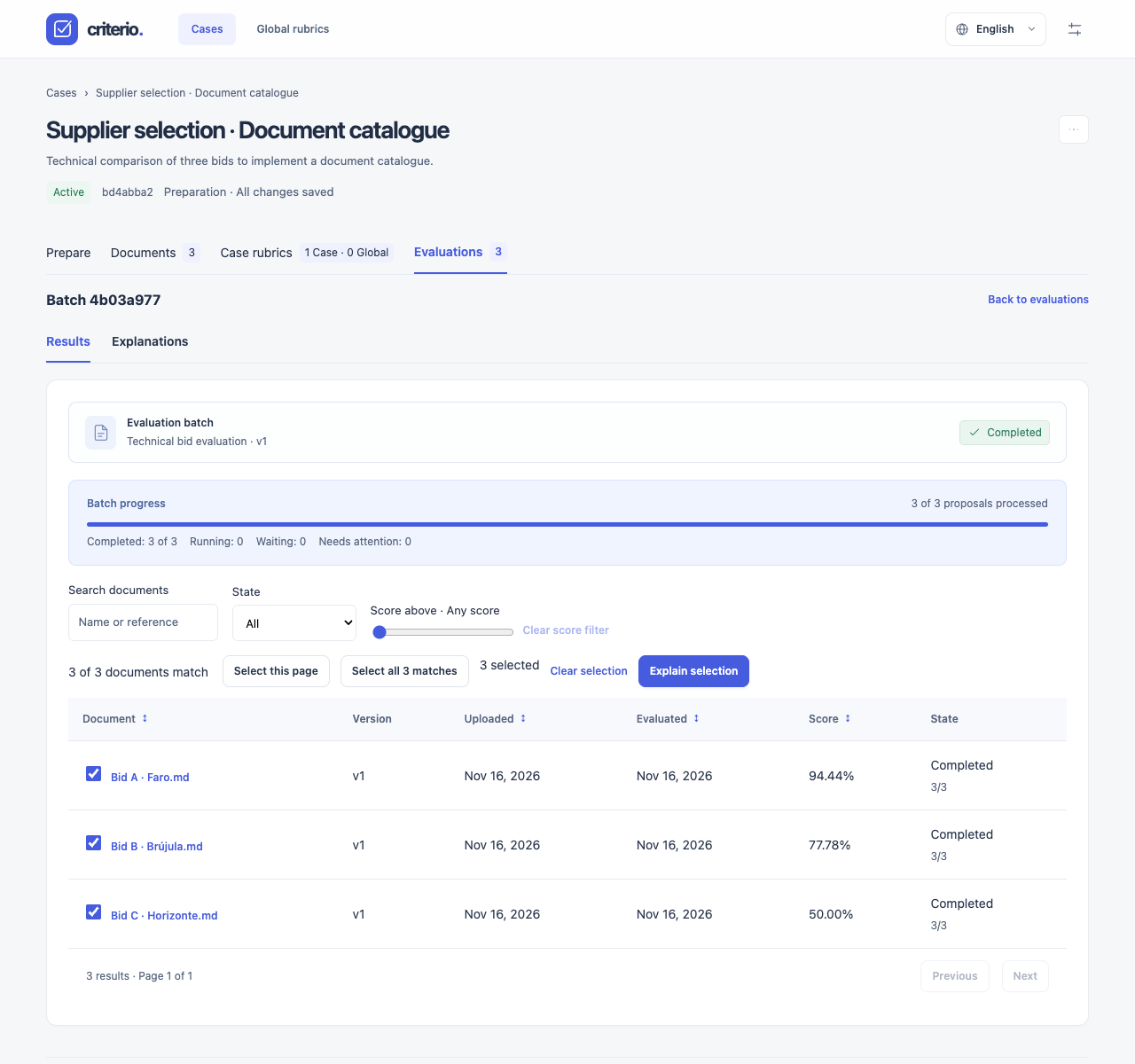
Criterio applies the same rubrics to every proposal and reviews each one in the same detail. That gives the team a common basis for comparison and makes differences easier to spot.
What does that mean for the review team?
Reviewers can spend less time finding and organising information and more time checking the evidence behind the scores. With the bids side by side, they can discuss which differences between suppliers matter to the decision. If two reviewers disagree on a score, they can go back to the same question and show each other which passages led them to different conclusions.
Criterio can also help while a bid is still taking shape, whether the team is responding to an RFP, putting together a commercial bid or drafting a technical proposal.
People from several departments often contribute to a proposal, each drawing on their own expertise. Bringing those contributions together can take several rounds of review. Even when the draft reads well as a whole, the team still has to check that it covers everything the client has asked for in enough detail.
The client’s requirements can also form the basis of a rubric. That gives the team a way to review its own drafts and see which sections need more work.
Imagine you’re writing the bid for that same platform. The client wants to know what you’ll deliver and how they can check that each deliverable meets their requirements.
As you review your draft, Criterio might point out that you’ve listed the deliverables but haven’t defined their acceptance criteria in enough detail. You can then revise that section and assess it again using the same rubric before you submit the proposal.
For the team writing the bid, a finding like this helps settle which revisions to tackle first. The method is the same one a procurement team can use to compare finished proposals. What changes is the timing.
A review can’t guarantee a particular score. It can show you where the bid needs work while you can still change it.
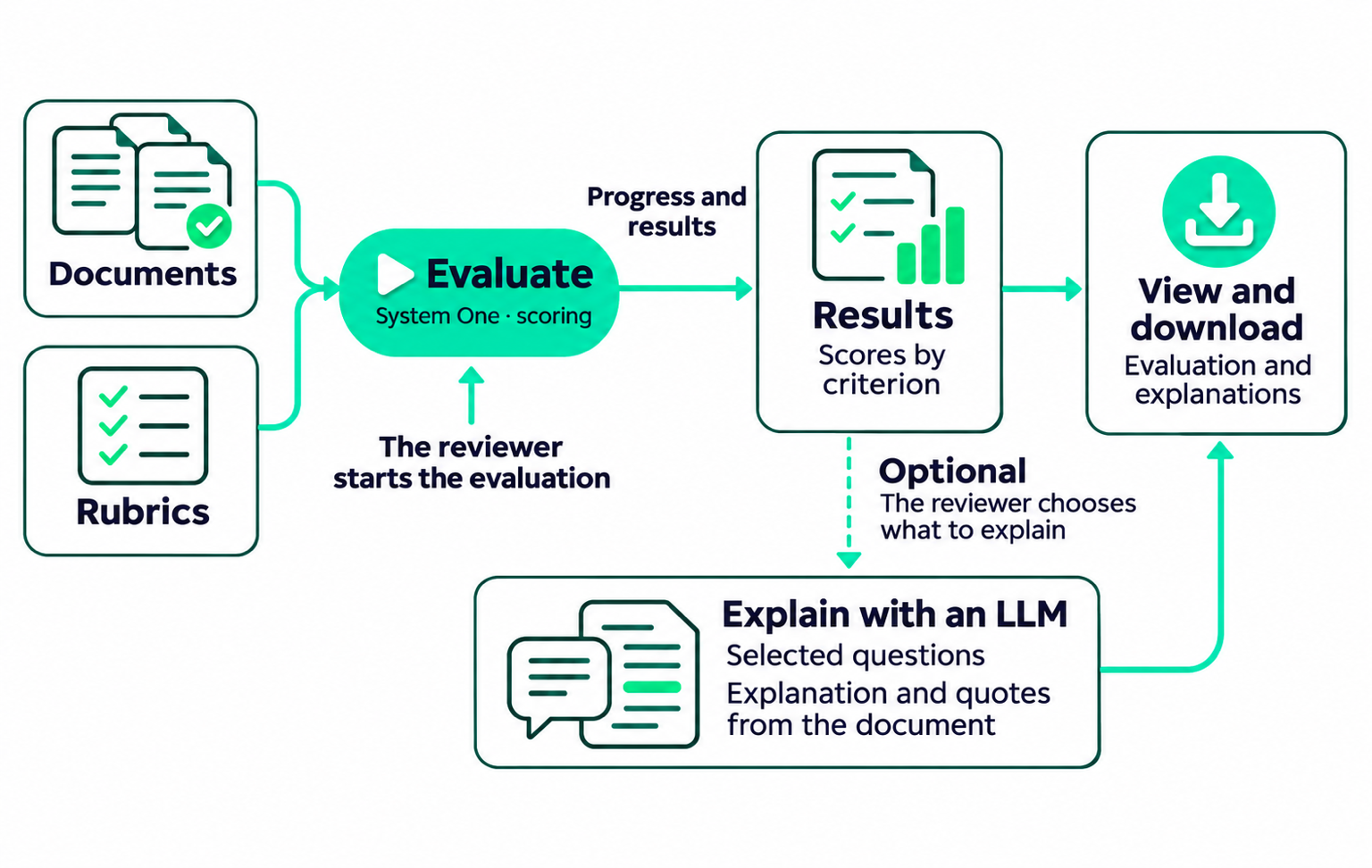
A document review in Criterio has three steps.
The team creates an evaluation case and adds the documents it wants to analyse. These might be bids from several suppliers, technical specifications or drafts of a proposal the team is preparing.
Each case keeps the documents and their evaluations together so the team can return to them later.
The team selects an existing rubric or creates one for the review. Each rubric sets out the questions to answer, what to look for and how to score the answers.
For the platform project, for instance, a rubric could distinguish between a bid that lists the deliverables and one that also explains how the client will check that they meet the acceptance criteria. The team can reuse that rubric or adapt it for a different evaluation.
Once the documents and rubrics are ready, Criterio uses AI to assess the content against the agreed criteria. The process can also draw on large language models (LLMs) running in the cloud or locally.
When there are several proposals, the team can evaluate them as a batch using the same rubrics, which makes the results easier to compare.
Reviewers can see the score for each question. If a score needs a closer look, they can ask for an explanation and follow the quoted passages back to the original document. That gives them evidence they can check when deciding between suppliers or revising a draft.
Teams can also export the results in formats such as JSON or Markdown for reference or reuse.
Criterio uses decision models, also known as System One models. They take information as input and answer questions in a predefined format. For example, a model can classify a passage, estimate how likely it is to contain a particular piece of information or assign it a score on a given scale.
The main advantages of decision models are speed and low cost. In scoring tasks, for example, they return the score directly, which takes less time and costs less than using a traditional language model (LLM) to generate an explanation for every answer.
Criterio uses these models to rate how well each document meets the evaluation criteria, with the rubric providing the scoring scale.
The score tells you which level the model assigned. To see why, you need to know what the supplier actually wrote.
That’s where a language model comes in. It can explain the score, but only when a reviewer asks for an explanation. If just a few scores need a closer look, the team can request those explanations and keep the cost of the review down.
One thing that sets Criterio apart from simply asking an AI model questions about a document is the emphasis it places on traceability.
In a technical evaluation, the result alone tells you only so much. You also need to see what information the assessment was based on and which criteria were applied.
That’s why Criterio keeps the versions of the documents and rubrics used in each evaluation. Teams can return to earlier results and review them in their original context.
Scoring and explanation are separate processes. Asking for a further explanation does not change the original scores.
Criterio also makes the limits of its analysis clear. If a document cannot be processed in full within the configured limits, Criterio tells reviewers when an assessment is based on selected passages.
This gives teams a way to check and discuss the results with reference to the original documents, rather than relying solely on an AI-generated answer.
AI can help teams analyse documents, but people still need to validate the results. An evaluation can flag a requirement that a proposal may have missed, highlight differences between proposals or draw attention to relevant information. The AI can still misinterpret what it reads.
That’s why Criterio is designed as a support tool: AI helps teams analyse and organise information, while the teams themselves remain in control of their assessments and decisions.
This combination lets reviewers draw on what AI does well while bringing their own knowledge and experience to the evaluation.
Criterio gives teams a structured way to assess information, with shared criteria and evidence to support each assessment. If you’re preparing a proposal, you can see which parts need strengthening before you submit it. If you’re reviewing several bids, you can compare how each one addresses the same requirements, identify where they differ and explain how you reached your conclusions. Working from the same criteria also makes it easier for reviewers to compare their assessments, bringing greater consistency and transparency to the review.
Criterio does more than speed up document analysis. It helps teams turn the information they review into clear assessments they can trace back to the source and verify. With less time spent reviewing and cross-checking documents, teams can focus on interpreting the results, identifying what could be improved and looking more closely at issues that need further analysis.
Its value extends beyond bids and proposals. A quality team preparing for an ISO audit can identify which records support each requirement and what evidence it still needs to gather. A procurement team deciding which product to buy can use the product data sheets to compare the options against its priorities and check details such as whether each warranty covers the required period.
In all these cases, Criterio brings AI analysis together with the knowledge and experience of people. Its value goes beyond making documents easier to review. It gives teams a common basis for interpreting the information, checking it against the evidence and acting on their findings. Used this way, technology helps build confidence in the evaluation process without replacing the decision-maker’s judgement.
Send an email to info.es@nagarro.com to schedule a demo.


 Return to the APSL blog


